
Tacto
GitHub
TACTO 1.0.0 RC11 Release candidate

Let your agent
use your apps.

It clicks, types and checks the result.
Build a task once, then run it again as is.

WORKS WITHClaudeCodex

macOS · Apple Silicon · Runs locally

See what your agent did in the activity history
TACTO IN ACTIONGitHub / Browser
“Show me open bugs, most commented first.”Search · filter · sort on the real GitHub
Recording of an actual run

Recorded in a separate Chromium · includes an illustrative guide pointer

01 / CONNECT

With the agent you already use.

Connect Claude or Codex and reuse the same Flow.

02 / REPLAY

Next time, only the new values.

Normal deterministic replay of a saved Flow makes no model calls.

03 / REPAIR

Judgment only where it’s needed.

Supported selector failures are reviewed and repaired from the failed step.

04 / VISIBILITY

Every access at a glance.

See the apps, actions and outcomes accessed through Tacto in the activity history.

See for yourself
what your agent did.

Which apps it accessed, and what it did there.
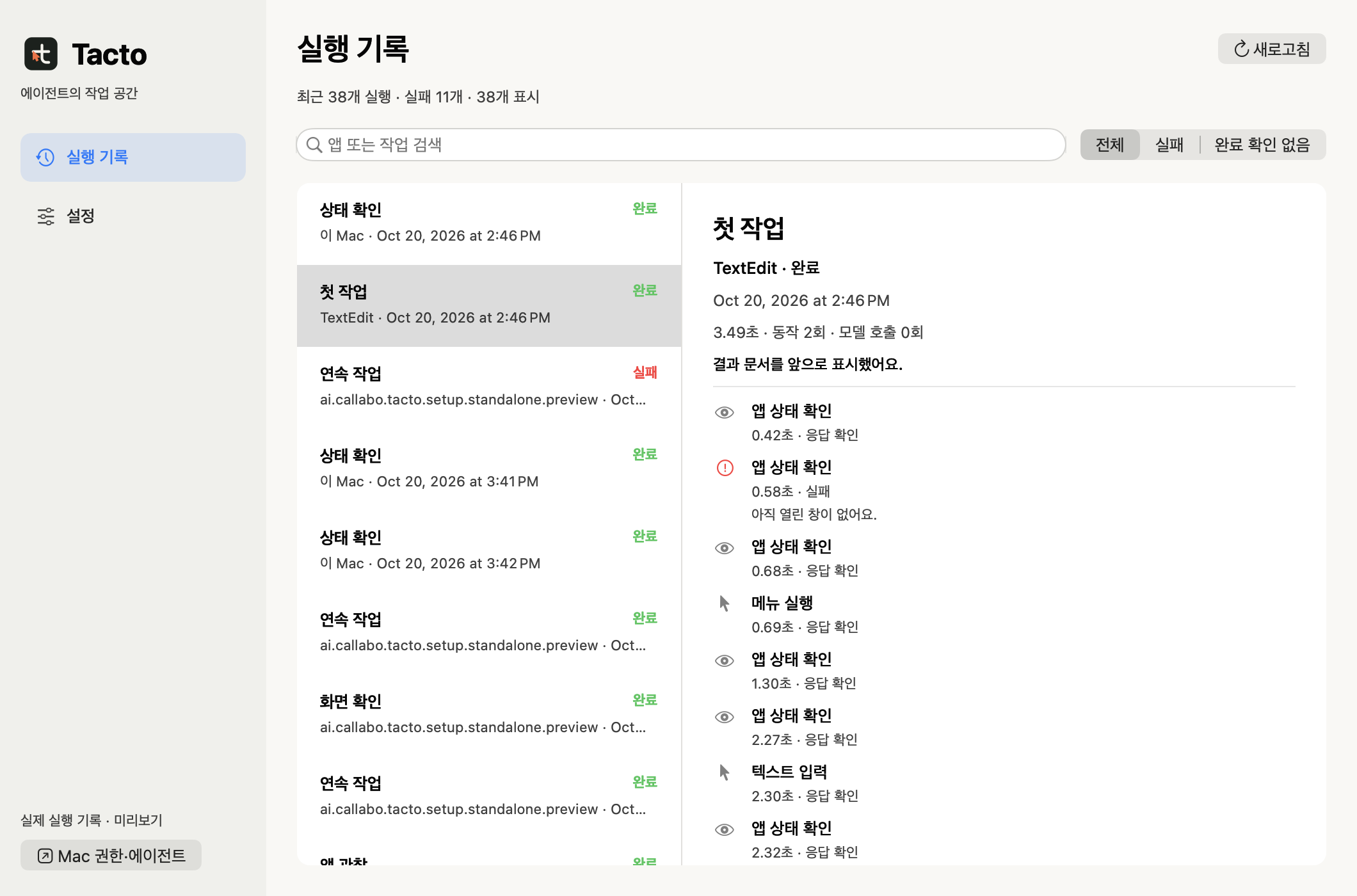
Review accesses made through Tacto as a timeline inside the app.

  • Apps accessed, with each step’s action, outcome and time
  • Find runs that failed or whose completion was not confirmed
  • Turn logging on or off and keep records for 7, 30 or 90 days
Records stay on this Mac. Screen content, input values, prompts and internal agent reasoning are excluded.
Tacto app preview loaded with 38 actual saved activity records, showing a list of runs alongside the actions, outcomes and times of a selected TextEdit task.
View full size · 38 actual activity records · App preview

Make it once.
Next time, just the inputs.

The saved Flow handles the repetition.
The agent steps back in only where judgment is needed.

Calculator · Reusable Flow6 actual steps
Inputs
Once at first · uses a model
ClaudeCodexAgent authors the Flow
Saved · same procedure next timecalculator-reusable
From then on, Flow replayNormal deterministic replay · 0 model calls
01 · ResetClear existing inputC / AC
02 · Check stateConfirm initial value0
03 · InputFirst number7
04 · Choose operationAdd+
05 · InputSecond number8
06 · Verify resultMatches expected value15
If a button changes · development versionAgent repairs only that stepReplay continues after verification
If completion can’t be confirmedStop · no resend
First authoring Normal replay Exception path
Result verified in the recording: 7 + 8 = 15
Watch the recording Original Flow JSON

An illustrative canvas based on the actual Calculator Flow. The authoring and repair paths and step highlights are illustrative; this page does not run a Mac app or a model. Repair scope

Same task,
two ways to run it.

Compared with Codex’s computer use (OAI/Sky). Three independent fresh-conversation pairs ran with the same requested model, reasoning effort and initial app state.

LESS TOTAL INPUT53.5%

Total input reduction across 3 fresh-conversation pairs

LESS NON-CACHED INPUT56.3%

Input reduction excluding cache reads

SHORTER OBSERVED TIME8.8%

Reduction in total time over 3 runs · single sample

Total input tokens

Including cache reads · sum of 3 runs
OAI/Sky433,312
Tacto201,447

Output tokens were nearly identical.
Tacto 1,605 · OAI/Sky 1,604

Includes first authoring, execution and final response · sum of 3 pairs (time is the mean)
Metric Tacto OAI/Sky
Successful tasks 3/3 3/3
Mean time 42.10 sec 46.17 sec
Total input 201,447 433,312
Input excluding cache reads 22,119 50,592
Output 1,605 1,604

Scope 2026-10-14 · our own AppKit test app · one pair each for bonus on, bonus off and a changed button. Both succeeded 3/3. OAI/Sky was faster in one case. These are observations from a small sample, not a re-measurement of the current release or a comparison of overall app performance or billing.

Full measurement conditions and results

2026-10-14 · Codex CLI 0.161.0 · requested model gpt-6.1-sol · medium · independent fresh conversations · our own AppKit test app. One pair each for bonus on, bonus off and a changed button; all succeeded. Includes first authoring, execution and the final response; excludes test setup time.

Tacto’s total time was 8.8% shorter, but Sky was faster with the bonus off. The actual serving model, server cache and billing were not verified. This was not a ten-replay comparison.

Download the measurement summary JSON
REPLAY IS A SEPARATE ADVANTAGE

Normal replay of a saved Flow: 0 model calls.

The figures above compare first-time authoring and execution. A matched comparison replaying OAI/Sky’s reusable script and a Tacto Flow ten times each has not been measured yet.

An 11-step complex Flow was verified too.

13/13 normal jobs completed · 5/5 expected stops · two buttons repaired in one job. These are results in our own test app, not a success rate across real business apps.

Move the app,
connect your agent.

Tacto 1.0.0-rc.11 is a release-candidate DMG for Apple Silicon, currently in stable-release qualification. Anyone can download it; it was verified on macOS 27.0.1 · Apple Silicon.

Download Tacto for Mac
The Tacto runtime and Flow format are the same for both.
  1. 01

    Install the Tacto app

    Open the DMG, drag Tacto into the Applications folder, then open Tacto from Applications. If you open it directly inside the read-only DMG, it will ask you to move it first.

    Tacto release candidate notes
    For developers: build from source

    Requires Python 3.11+, uv, Xcode Command Line Tools and an Apple-issued code-signing certificate. The DMG is recommended for regular use.

    git clone https://github.com/Open330/tacto.git
    cd tacto
    uv sync
    ./build.sh
    ./skill/install.sh
    Installation requirements and signing setup
  2. 02

    Turn on two macOS permissions

    In the Tacto window, under ‘1. Mac 권한’ (Mac permissions), press ‘설정 열기’ (Open Settings) for each item and follow the guide beside it: allow app control for Tacto Helper and screen recording for Tacto. If you are switching from Preview 8 or earlier, grant each permission again to the new Tacto app. After connecting your agent in step 3, you can also check from the terminal with the command below.

    ~/.local/bin/tacto doctor
  3. 03

    Connect Claude and get started

    Once both permissions are on, press ‘에이전트에 연결’ (Connect to agent) in the Tacto window to connect the command and skill to Claude Code and Codex. Then send the request below in a new conversation. Feel free to swap in the app and task you actually need.

    Use the Tacto skill to calculate 12 × 34 in Calculator and verify the result. Save it as a parameterized Flow so I can run it again with different inputs.

    If your agent cannot find the skill, restart its conversation session and check the ‘2. 에이전트 연결’ (Agent connection) status in the Tacto window.

Frequently asked questions.

Can I use both Claude and Codex?

Yes. The install script connects the skill and the Tacto command for both agents. Saved Flows are not tied to a model. In the development version, the automatic selector repair CLI option is --auto-repair codex, and the automatic repair provider is Codex.

Is there really no model cost?

Normal deterministic replay does not call a model. First authoring, judgment steps included in the plan, and supported failures after automatic repair is enabled do use the model. It does not mean the cost of the app or the execution environment is zero.

What happens if the screen changes?

Tacto finds the target again from a fresh observation. Supported static-selector failures can be repaired with a short candidate packet and resumed after a verified checkpoint. It stops if a value, state or target has changed, or if the outcome is uncertain. Automatic resume that needs an earlier capture, every UI change and crash recovery are not supported.

Is installation just one download?

Almost. Move the Developer ID–signed and notarized DMG’s app into Applications and open it, turn on two macOS permissions, then connect your agent in the app. This is currently a release candidate, verified on macOS 27.0.1 · Apple Silicon. Intel Mac and Windows builds are not provided. Installing only the Python wheel does not give you the signed macOS helper. Current status: release candidate, not yet the stable release.

For recurring work,
a Flow you can reuse.

Start with the work you want to hand off.
See each scenario’s design alongside actual recorded runs.

The scenarios above are design examples of how Tacto could be used. Recordings verify only the operations shown; they do not prove account connections, cross-app handoffs or completion of the whole task.

Less talk,
real runs.

From Mac apps to the browser. See the actual actions and verified results in each recording.

10 recordings · 8 real apps or sites + 2 public test sites

Start with apps you know.

Tasks performed outside our own test app. The request sentences are illustrative; the recordings show authored Flows actually executing.

Showing 10 examples.

01 · DocsReal Mac app · TextEdit

Write a note,
then verify what was saved.

About 10 sec · Mac window capture · includes guide pointer

Document matches disk contents

Actions and verification scope
“Write and save notes for the workshop prep.”

Typed the notes into a dedicated document, then a separate Save replay verified that the document matched the contents on disk.

A separate step was needed to confirm the save after typing, and the saved-state check passed. This run did not complete end to end on its own.

Actual capture without pointerVideo without pointer
02 · FilesReal Mac app · Finder

Sort files by kind,
then by name.

About 8 sec · Mac window capture · includes guide pointer

Sort by kind → sort by name · 5 files

Actions and verification scope
“Show this folder by kind, then sort it by name at the end.”

Operated the Kind and Name headers in the real Finder and verified ascending name order and five files.

A folder containing only files made for the recording. Nothing was moved or deleted, and the personal sidebar and path are excluded from the video.

Actual capture with personal areas excludedVideo without pointer
03 · LanguageReal website · Google Translate

A short English sentence,
checked in Korean.

About 7 sec · separate Chromium · includes guide pointer

English input · Korean result shown

Actions and verification scope
“Translate ‘Hello. Thank you.’ into Korean.”

Entered the sentence in Google Translate’s actual input box and verified the Korean result “안녕하세요. 감사합니다.”

A synthetic example sentence is sent to Google. Proof that the input step completed is inconclusive; the Korean output was checked separately. This is not an evaluation of overall translation quality.

Actual capture without pointerOpen the recorded site
04 · WorkReal website · GitHub

Only the open bugs,
most commented first.

About 9 sec · separate Chromium · includes guide pointer

Open-bug filter · sorted by comments

Actions and verification scope
“Show me open bugs in VS Code, most commented first.”

Applied an open-bug, comments-descending query to the microsoft/vscode issue list and verified the URL, search value and 25 results.

The public repository was only read. No issue, comment or sign-in was made, and the list reflects its state at recording time.

Actual capture without pointerOpen the recorded site
05 · EverydayReal website · UnitConverters.net

Meters to feet,
checked against the math.

About 9 sec · separate Chromium · includes guide pointer

3.5 m → 11.482939633 ft

Actions and verification scope
“Convert 3.5 meters to feet.”

Selected the input value and output unit to get 11.482939633 ft, then compared it with the separate calculation 3.5 ÷ 0.3048.

Run on a real conversion site. After input, the output unit is selected to confirm that the site updated its calculation.

Actual capture without pointerOpen the recorded site
06 · DocsReal website · Markdown Live Preview

Turn the top of a document
into a weekend plan.

About 18 sec · separate Chromium · includes guide pointer

Headings, lists and bold text rendered

Actions and verification scope
“Change the top of the existing sample into a weekend plan and check the formatting.”

Edited the opening of the sample in the real editor and verified that the plan’s title, subheading, two lists and bold text rendered.

A partial edit; the rest of the default sample content remains. The whole document was not replaced, saved or exported to PDF.

Actual capture without pointerOpen the recorded site
07 · InfoReal website · Wikipedia

Look it up,
jump to the right section.

About 14 sec · separate Chromium · includes guide pointer

Search the Seoul article · go to History

Actions and verification scope
“Search Wikipedia for Seoul and open the History section.”

Searched for Seoul, moved to the History section, and verified the final URL and the heading shown on screen.

A real public article, no sign-in.

Actual capture without pointerOpen the recorded site
08 · MathReal Mac app · Calculator

Same calculation steps,
different inputs.

About 14 sec · Mac window capture · includes guide pointer

7 + 8 = 15 · reused 3 + 9 = 12

Actions and verification scope
“Calculate 7 plus 8. Next time, 3 plus 9 with the same Flow.”

Operated the buttons of the real macOS Calculator and verified 15 and 12. The second task changed only the inputs of the same Flow.

An existing real recording, edited only to trim the wait between the two tasks.

Actual capture without pointer
09 · TestPublic test site · Books to Scrape

Pick from a category,
check price and stock.

About 9 sec · separate Chromium · includes guide pointer

Book detail · fictional price and stock

Actions and verification scope
“Check this book’s price and stock in the travel books category.”

Opened the specified book in the Travel category and verified the £49.43 price and 15 in stock.

A fictional product on a public shopping test site. Not a real price or purchase.

Actual capture without pointerOpen the recorded site
10 · TestPublic test site · Selenium

Fill in several fields,
review before submitting.

About 13 sec · separate Chromium · includes guide pointer

Four text, date and option values verified

Actions and verification scope
“Fill in the message, date and option, and show me before submitting.”

Entered four values (text, message, the date 2026-10-20 and option Two) and verified each one.

A public test form. Submit was not pressed and no registration was completed.

Actual capture without pointerOpen the recorded site

Browser examples use a separate Chromium session opened by the Python API. Connecting to your own Chrome or Safari tabs is out of scope. Mac examples use the real TextEdit, Finder and Calculator. None of the examples completed a sign-in, payment or external post.

Pointers, click marks and highlights are illustrative guides, not recordings of the system cursor. Web recordings are actual viewport video; Mac recordings are chronological window captures. They include capture delays and a held final frame, so they cannot be used to compare run times.

Browser run conditions, results and file hashesTextEdit and Finder run conditions, results and file hashes
Our own app for separate verification: an 11-step Flow reused 5 times
02Our own native test app

Input, calculate, review,
five jobs in a row.

About 17 sec · actual window capture + guide pointer · chronological playback, speed unchanged

“Enter these five jobs in the same order and verify the calculated results.”

Replayed 11 steps: field input, option selection, review, calculation, result comparison and completion check. The results were 89, 34, 62, 79 and 108, and it was separately verified that each job left exactly one completion record.

A test app built for recording, not a commercial business app. Normal replay made 0 model calls; first-authoring cost is separate.

Watch the original video without pointer View the original screenshot of the actual result

Only this recording uses our own test app. It is separate from the 10 everyday examples above and does not indicate a success rate for general business apps.

How do I apply this to my work?

Start with tasks like creating documents from set content, entering many records into the same form, or checking results after input. Complete and verify one case in the app you use first, then save the steps to repeat as a Flow. Compatibility with each business app needs to be checked individually.

Prepare a first task in your app

Same task.
Different inputs.
One Flow.

The examples below illustrate normal replay, a changed button and an uncertain result, as verified in the test app.

An illustrative interactive example. It does not run a real app or a model. batch and automatic repair refer to the development checkout.

tacto / reusable-workflow
$tacto batch template.json --helper --auto-repair codex < jobs.jsonl
01Locate input fields in a fresh observation
02Enter parameters · check bonus state
03Review → calculate → complete
Result conditions verified
VERIFIED REPLAY0 model calls

Hand off the repetition.
Move on to what’s next.

Get started with Tacto Browse the source